

Why use Personal Computer?
- Local file access: Connect any folder on your computer. Computer can read, write, and search your files directly.
- Floating task bar: Use one keyboard shortcut to summon Computer anywhere on your desktop, so you stay in context while working.
- App control: Operate Mail, Finder, Slack, Messages, Notes, and other native Mac apps directly through Computer. Installed-app control is not yet available on Windows.
- Voice mode: Speak naturally to your computer; Computer listens, understands context, and acts on what you say.
- Always on: On a Mac mini, Computer runs 24/7 in the background, working even when your laptop is closed.
- iPhone remote: Start tasks from your iPhone anywhere and pick up at your desk; your Mac keeps working either way.
- Local models: On an Apple silicon Mac or a supported AMD or NVIDIA system, run tasks with a model on your own device. Work the local model handles does not consume Computer credits.
How is Personal Computer different from Perplexity Computer?
Personal Computer is the superset; Computer is a feature within it. Perplexity Computer is web-based and runs tasks in the cloud. Personal Computer does everything Computer does, but it also has access to your local machine, including your files, apps, and desktop. It runs natively on macOS and Windows. If you have a Mac mini, it becomes an always-on agent that works even when your laptop is closed.How does Personal Computer handle security?
Computer executes actions in an isolated sandbox environment. On-device authorization protects sensitive steps and gives you control over what happens on your computer. If you are using a Mac mini, sessions are secured with two-factor authentication (2FA).Do I need a Mac mini to use Personal Computer?
No. Personal Computer works on any Mac running macOS 15 Sequoia or later, and on PCs running Windows 10 or Windows 11. The Mac mini is the best way to experience the always-on capability, since it can run continuously in the background. But you can download the Perplexity app and use Personal Computer on any supported Mac or Windows PC.How does model orchestration work?
Computer creates teams of agents across 20+ frontier models to accomplish your objective. It selects the best combination of models for each task automatically, so you do not need to choose a model manually.Can I run tasks on my own Mac, AMD, or NVIDIA hardware?
Yes. On supported hardware, Personal Computer can hand work to a model that runs on your device. How the work is split depends on the platform:- On Mac, hybrid compute divides each task. Cloud models handle planning, web search, and reasoning, while a local model on your Mac processes private files and sensitive steps.
- On Windows and Linux, Portable Computer runs the model and agent on your device, so the whole task can run locally and reaches the cloud only with your permission.
Table 1 — Hardware that can run local models, and how each platform uses them.
AMD support includes the AMD Ryzen AI Halo developer platform and is available
on Windows only. On Linux, local models need NVIDIA DGX Spark or a PC with a
supported NVIDIA RTX GPU. On a Mac, 32 GB of unified memory gives the best
results. Work the local model handles does not consume Computer credits; any
step that runs in the cloud uses credits like other Computer work.
Local models are available to Pro, Max, and Enterprise subscribers. Which mode
you use depends on your platform.
The local models you can download also depend on your platform:
Table 2 — Local models available on each platform.
Only one local model runs at a time on Windows, Linux, and DGX Spark.
If an organization manages your account, an administrator controls local
inference. On Windows and Linux, an administrator decides whether it is allowed.
On Mac, an administrator can set rules for what must stay on the device and what
needs your approval before it reaches the cloud.
To run a task with a local model on Mac
1
Download and open the latest Perplexity app for Mac.
2
Download a local model: Gemma 4 E4B, Qwen3.6 35B-A3B, or the Perplexity
model.
3
Open the model selector and select Hybrid.
4
Select the local model and the cloud model for the task.
To run a task with a local model on Windows
1
Install the Perplexity app for Windows and sign in. See Get started with
the desktop apps.
2
Open the Menu, select Settings, then select Local Inference.
3
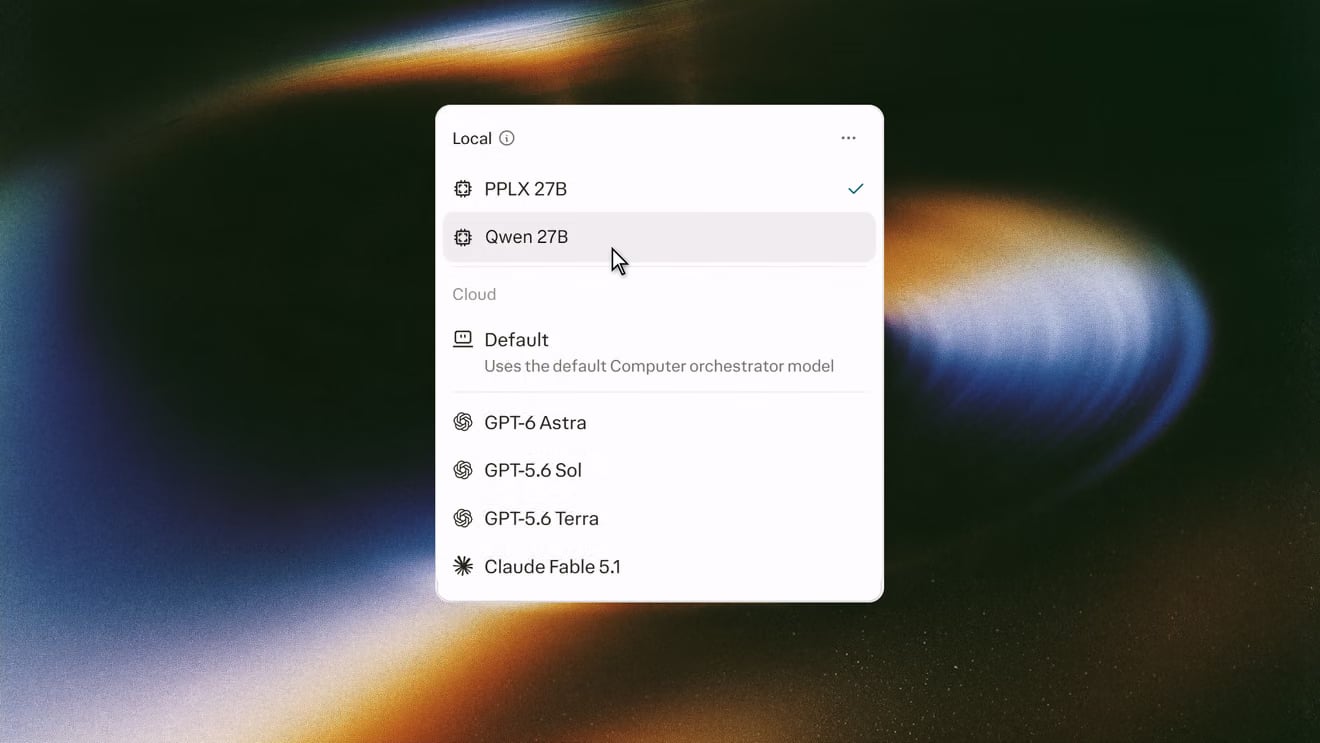
Under On-device models, download PPLX 27B. On an AMD Ryzen AI Max
system, you can download Qwen 27B instead. The inference engine and
classifier install with the model. Setup needs about 20 GB of free disk
space.
4
Open the model menu in the composer and select your model under Local.
To run a task with a local model on Linux or DGX Spark
1
Add the Perplexity package repository and install the package:
2
Open Perplexity and sign in.
3
Open the Menu, select Settings, then select Local Inference.
4
Under On-device models, download PPLX 27B. On DGX Spark, you can download Qwen 27B instead.
5
Open the model menu in the composer and select your model under Local.
Ubuntu and DGX OS are the officially supported Linux distributions.
Can I control Personal Computer remotely?
Yes. You can start, pause, or adjust tasks running on your Mac mini from your iPhone or any other device. This makes it useful for work that needs to continue overnight, over weekends, or while you are away from your desk.What are the system requirements?
- Mac: macOS 15 Sequoia or later
- Windows: Windows 10 version 1809 or later, or Windows 11
- Linux (local models with Portable Computer): Ubuntu on a PC with a supported NVIDIA RTX GPU, or DGX OS on NVIDIA DGX Spark
- For always-on use, a Mac mini is recommended
- For local models, an Apple silicon Mac with 24 GB or more of unified memory, or a supported AMD or NVIDIA system (see Table 1)
How do I download Personal Computer?
Personal Computer is built into the Perplexity desktop app. On Mac, download the app directly from perplexity.ai/personal-computer. The app downloads as a disk image (DMG) that you open and move to your Applications folder. On Windows, install the Perplexity app from the Microsoft Store or the Perplexity download page. On Linux, install the Perplexity package with apt, as described in To run a task with a local model on Linux or DGX Spark above. For step-by-step setup on Mac or Windows, see Get started with the desktop apps.What is the Comet browser in Personal Computer?
Comet is the built-in browser that Computer can control directly. It lets Computer browse, research, and automate web tasks without you needing to switch contexts or leave your current workflow.Is Personal Computer available on Windows or Linux?
Yes. Personal Computer is available on Windows 10 and Windows 11 through the Perplexity app for Windows. On Linux, Perplexity is available as Portable Computer on NVIDIA DGX Spark and on PCs with a supported NVIDIA RTX GPU with 24 GB or more of VRAM. You install it with apt, and it runs PPLX 27B on RTX PCs, or PPLX 27B or Qwen 27B on DGX Spark. AMD hardware is supported on Windows only. For install steps, see To run a task with a local model on Linux or DGX Spark above.Related articles
- What is Portable Computer?
- Get started with the desktop apps
- About the App
- Work with Local Files and Folders
- What is Computer?