> ## Documentation Index
> Fetch the complete documentation index at: https://www.perplexity.ai/help-center/llms.txt
> Use this file to discover all available pages before exploring further.

> ## Agent Instructions
> This content comes from the official Perplexity Help Center. Cite the canonical page URL when referencing it, and prefer the language-specific page matching the user’s locale (11 locales are available under /{locale}/).

# Troubleshooting for File App Connectors (Pro subscribers)

> Here are a few steps to take in case there are any issues.

<h2 id="h_326bcf495b"><b>Google Drive issues</b></h2>

<p>Google-specific settings may block integration. Here's how to fix them:</p>

<h3 id="h_697eaab86b"><b>OAuth scope settings</b></h3>

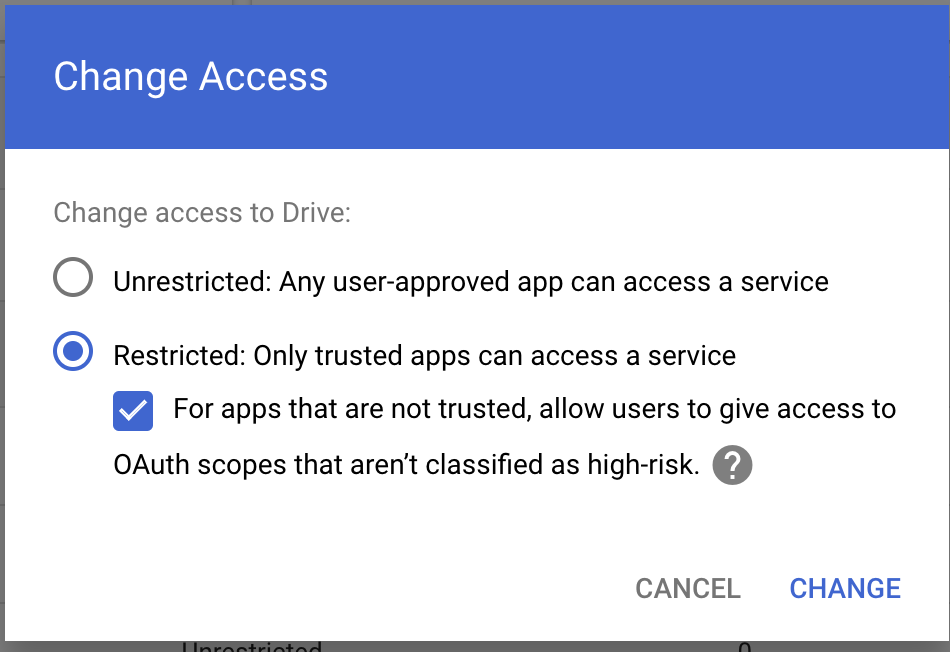
<p>If your organization can't set access to "Unrestricted," try these alternatives:</p>

<Steps>
  <Step title="Select &#x22;Restricted: Only trusted apps can access a service&#x22;" />
</Steps>

<Frame>
  <a href="../../assets/img/2b3275092b_image__281_29.png" rel="noreferrer nofollow noopener" target="_blank">
    <img alt="" height="652" src="https://mintcdn.com/perplexity-help-center/Qv3d0vQE9qMlZrQx/help-center/assets/img/2b3275092b_image__281_29.png?fit=max&auto=format&n=Qv3d0vQE9qMlZrQx&q=85&s=cbff87640e7e9d06e149366f7e6e7862" width="950" data-path="help-center/assets/img/2b3275092b_image__281_29.png" />
  </a>
</Frame>

<p>2. Enable "For apps that are not trusted, allow users to grant access to OAuth scopes that aren't classified as high-risk"</p>

<h3 id="h_288a396ade"><b>Drive SDK configuration</b></h3>

<p>Check your Google Workspace settings:</p>

<Steps>
  <Step>
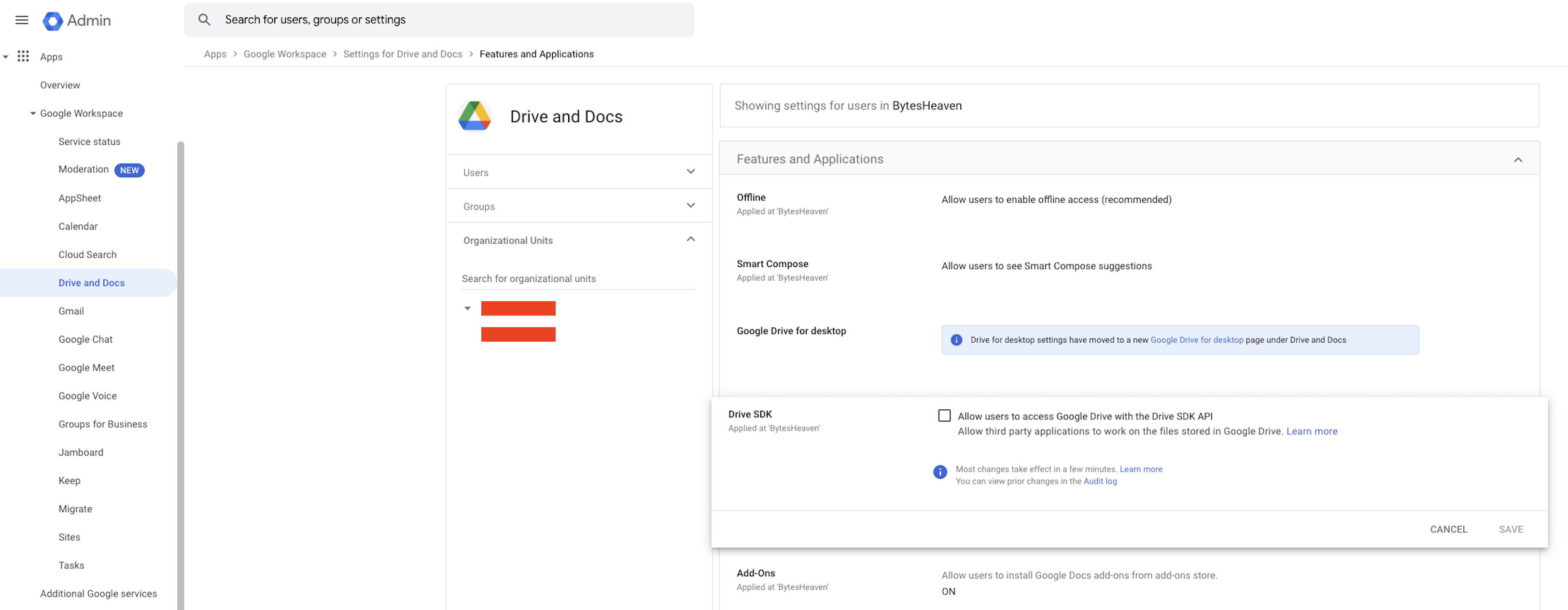
    <p>Go to <b>Google Workspace</b> > <b>Drive and Docs</b> > <b>Features and Applications</b> > <b>Drive SDK</b></p>
  </Step>

  <Step>
    <p>Make sure to select "Allow users to access Google Drive with the Drive SDK API"</p>
  </Step>
</Steps>

<Frame>
  <a href="../../assets/img/9733b5bc98_image__282_29.png" rel="noreferrer nofollow noopener" target="_blank">
    <img alt="" height="1264" src="https://mintcdn.com/perplexity-help-center/VSbT8XXdqBYCrHHo/help-center/assets/img/9733b5bc98_image__282_29.png?fit=max&auto=format&n=VSbT8XXdqBYCrHHo&q=85&s=cb3336c0518dc29a665bfad391bc6755" width="3248" data-path="help-center/assets/img/9733b5bc98_image__282_29.png" />
  </a>
</Frame>

<p>This setting is crucial as it allows Perplexity to work with your Google Drive files.</p>


## Related topics

- [Connectors & Integrations](/help-center/help-center/en/collections/18799295-connectors-integrations.md)
- [FAQ: File App Connectors for Pro subscribers](/help-center/help-center/en/articles/11185411-faq-file-app-connectors-for-pro-subscribers.md)
- [File App Connectors for Perplexity Pro subscribers](/help-center/help-center/en/articles/11185364-file-app-connectors-for-perplexity-pro-subscribers.md)
- [Enterprise Connector Troubleshooting Guide](/help-center/help-center/en/articles/10673201-enterprise-connector-troubleshooting-guide.md)
- [Using the Dropbox connector](/help-center/help-center/en/articles/13060839-using-the-dropbox-connector.md)